Category: STAFF BLOG

  • New Monitoring Strategies Implemented

    We have improved our server monitoring technology so that we are aware of not only CPU load, but also high disk input/output, memory usage, and capacity limitations on every server we operate more quickly so that we are able to be more efficient with our precautionary tactics and more diligent in our maintenance strategies, resulting in improved uptime percentages since we will be more able to resolve issues prior to the resulting outages or performance impacts.

    Our hosting company is one of the only providers that is aware of – and works toward resolving – problems before they are reported by clients. We are also one of the few to provide immediate response and public updates and to take a genuine and personal interest in ensuring that our customers are happy. After five years, our hosting division is larger than ever but our dedication to stability and focus on client satisfaction remains solid. Thank you all for your feedback and for your continued business.

    Have a great Tuesday!

  • We Are a Proud CloudFlare Certified Hosting Partner!

    We Are a Proud CloudFlare Certified Hosting Partner!

    How CloudFlare increases speed and security of your site

    This is a guest post written and contributed by CloudFlare.  CloudFlare makes it easy for any site to be as fast and secure as the Internet giants.

    CloudFlare, a web performance and security company, is excited to announce our partnership with eDP Hosting and Administration, a subsidiary of eDesign-Pro Company owned and operated by Toler Enterprises! If you haven’t heard about CloudFlare before, our value proposition is simple: we’ll make any website twice as fast and protect it from a broad range of web threats.

    Today, hundreds of thousands of websites—ranging from individual blogs to e-commerce sites to the websites of Fortune 500 companies to national governments — use CloudFlare to make their sites faster and more secure. We power more than 65 billion monthly page views — more than Amazon, Wikipedia, Twitter, Zynga, AOL, Apple, Bing, eBay, PayPal and Instagram combined — and over 25% of the Internet’s population regularly passes through our network.

    Faster web performance

    CloudFlare is designed to take a great hosting platform like eDP Hosting and Administration and make it even better.

    We run 24 data centers strategically located around the world. When you sign up for CloudFlare, we begin routing your traffic to the nearest data center.
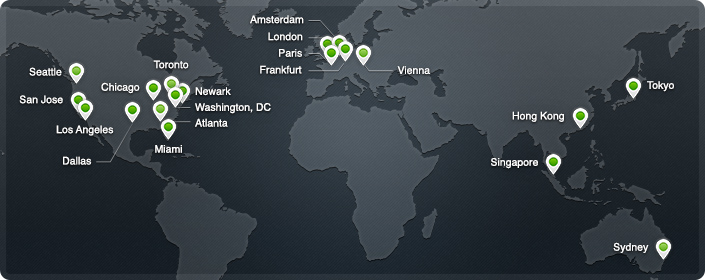
    As your traffic passes through the data centers, we intelligently determine what parts of your website are static versus dynamic. The static portions are cached on our servers for a short period of time, typically less than 2 hours before we check to see if they’ve been updated. By automatically moving the static parts of your site closer to your visitors, the overall performance of your site improves significantly.

    CloudFlare’s intelligent caching system also means you save bandwidth, which means saving money, and decreases the load on your servers, which means your web application will run faster and more efficiently than ever. On average, CloudFlare customers see a 60% decrease in bandwidth usage, and a 65% in total requests to their servers. The overall effect is that CloudFlare will typically cut the load time for pages on your site by 50% which means higher engagement and happier visitors.

    Broad web security

    Over the course of 2011, CloudFlare identified a 700% increase in the number of distributed denial of service attacks (DDoS) we track on the Internet (see the chart below). As attacks like these increase, CloudFlare is stepping up to protect sites.

    CloudFlare’s security protections offer a broad range of protections against attacks such as DDoS, hacking or spam submitted to a blog or comment form. What is powerful about our approach is that the system gets smarter the more sites that are part of the CloudFlare community. We analyze the traffic patterns of hundreds of millions of visitors in real time and adapt the security systems to ensure good traffic gets through and bad traffic is stopped.

    In time, our goal is nothing short of making attacks against websites a relic of history. And, given our scale and the billions of different attacks we see and adapt to every year, we’re well on our way to achieving that for sites on the CloudFlare network.

    Signing up

    Any website can deploy CloudFlare, regardless of your underlying platform. By integrating closely with eDP Hosting and Administration, we make the process of setting up CloudFlare “1 click easy” through your existing eDP Hosting and Administration cPanel dashboard. Just look for the CloudFlare icon, choose the domain you want to enable, and click the orange cloud. That’s it!

    We’ve kept the price as low as possible and plans offered through eDP Hosting and Administration are free! Moreover, we never charge you for bandwidth or storage, therefore saving you tons via reduced bandwidth costs.

    For site owners who would like to take advantage of CloudFlare’s advanced offerings, we also offer a ‘Pro’ tier of service for $20/month. The ‘Pro’ tier includes all of the ‘Free’ tier’s offerings, as well as extra features like SSL, full web application firewall and faster analytics.

    We’re proud that every day more than a thousand new sites, including some of the largest on the web, join the CloudFlare community. If you’re looking for a faster, safer website, you’ve got a good start with eDP Hosting and Administration, but the next step is to join the CloudFlare community.

  • HOSTING CLIENTS: EDP2 Brute Force Flood Attack

    There is an apparently ongoing and highly-distributed, global attack on WordPress installations across virtually every web host in existence. Because there are over 40,000 IP addresses associated with this attack, it is difficult to block access on an IP-basis.

    From what we can tell, the source of these types of attacks began several months ago — our clients and servers have been lucky up to this point to have not been hit with these attacks. The symptoms of this attack are a very slow backend on your WordPress site, or an inability to log in. In many instances, such as what we are seeing today, the entire server can be affected by overload and database inaccessibility which prevents the sites from loading at all.

    Since we do specialize in WordPress hosting and design, our servers are especially vulnerable to these attacks and as such, we are taking every action possible to resolve and prevent these issues.

    We are looking into the possibility of password-protecting all wp-login.php files .htaccess on the server, but will need each client’s approval in order to utilize this method of protection.

    Again, please recognize that this is a global issue affecting all web hosts and we are doing all that we can to rectify the issues being caused by this influx of attack attempts on our servers, particularly EDP2.

    WordPress Login – Brute Force Attack

    Measures You Can Take to Prevent Similar Attacks

    • Secure (by password protection) wp-login.php for all WordPress sites in your cPanel account. This will help deter this type of attack.
    • Generate a SECURE password: http://strongpasswordgenerator.com
    • Log into your WordPress powered websites and change your passwords, ensuring that they are at least 8 characters in length and seemingly randomized, including both upper and lowercase letters as well as numbers and special characters.

    If you would like help in accomplishing either of these tasks, please contact support via email or create a support ticket in the client billing portal. We will update this blog post when we have further information.

  • WordPress Blogger Importer Plugin Issue: Publishes Articles Saved as Drafts

    I’ve noticed in processing the last few Blogger to WordPress migrations for clients that their draft articles are being processed into WordPress as “published” which makes them accessible by readers rather than saved privately in the back end of the site for completion.

    After doing some research, I have found that the problem is within the plugin that performs the import itself — the function isDraft was returning a perpetual “false” statement because of an incorrect schema used for parsing the Blogger XML. In order to fix this glitch, you’ll need to open the file blogger-importer-blogitem.php within the Blogger Importer plugin and change the following:

    from:

    define('SIMPLEPIE_NAMESPACE_ATOMPUB', 'http://www.w3.org/2007/app');

    to:

    define('SIMPLEPIE_NAMESPACE_ATOMPUB', 'http://purl.org/atom/app#');

    Make sure you replace the entire string and that you keep the second string completely intact, including the hash symbol at the end of “app” in order for this to work properly. Importing using the plugin after making this modification should return published, scheduled, and draft articles appropriately.

    As always, if you are not comfortable making these changes or would like assistance, contact us for assistance!

  • Alternatives to FeedBurner – We Can Help!

    Information & Options for Replacing FeedBurner

    Most of you have heard the buzz regarding the FeedBurner service’s recent inconsistent numbers and uncertain future. We’re here to help! If you currently utilize the Feedburner service powered by Google, you’ve likely noticed that your numbers have dropped to zero and there has been a lot of talk about a possible shutdown in the near future. Google isn’t being particular forthcoming with relevant information and while they haven’t confirmed that they do intend to shut down the Feedburner service, I understand your concern if a shutdown would affect you. Google shut down its Japanese version without any warning and completely dropped the domain so users were left with lost email subscribers, dead feeds, and no way to recover them or the related statistics.

    After considering all the alternatives, I’ve selected some of the most beneficial and widely trusted services and have packaged together alternatives that can be processed efficiently for everyone who may need assitance with the transition.

    As a MailChimp user of 3.5 years (I signed up with them in April of 2009 and have used the service DAILY since then to manage multiple email campaigns across four different subscriber lists), I suggest using the RSS to email functionality to replace FeedBurner’s daily emails – you also have the option of creating a weekly, monthly, or on-demand mailing to your subscriber base! MailChimp is free for up to 2,000 subscribers and 12,000 emails per month. If you sign up with them, be sure to use our affiliate link so that we BOTH get $30 credited to our accounts when you upgrade to a paid plan with unlimited email sends, which start at only $10 per month: http://eepurl.com/pLH4r. MailChimp also makes it extremely simple for customers to take advantage of their nonprofit discounts for organizations that qualify. :) We are offering complete setup and configuration of this service as well as newsletter/email customization and/or template arrangement.

    MailChimp’s reports give you specific details about your delivered emails, including who opened them, how many times they were opened, the regional locations in which they were opened, and they even track when they’re forwarded. You get other details as well like how your statistics measure to industry averages. MailChimp’s API keys allow you to connect MailChimp with third party services and WordPress plugins fully sync your platform installation with the service. If you aren’t interested in having a customizable email output, you can also utilize WordPress’ JetPack for your email subscriptions, which is built into your platform installation.

    Need an online feed service as well? I HIGHLY recommend using your website’s built-in feed (for WordPress users, it’s usually http://YOURDOMAIN.com/feed) – it can be subscribed to using ANY feed reader out there and when paired with one of the plugins I am going to link you to below, statistics are available right from within your dashboard. We do offer migration from FeedBurner and account setup if you choose to utilize a third party service. There are many options available, include the following:

    • FeedBlitz is quickly becoming the go-to service when leaving FeedBurner behind and seems to be very widely trusted. It’s not a free alternative, but has reasonable pricing if you are willing to invest financially.
    • FeedCat is a free service, but placing their button code is required to boost your feed there and in doing so, you agree to allow them to serve ads on your website. I like the layout of the online feed better than that of FeedBlitz as well as the subscription and statistics tracking options, but serving ads on my sites isn’t something I’m willing to allow them to do, so this is a choice you will have to weigh against the features. FeedCat allows you to choose to have it reread your feed data anywhere from hourly to weekly.
    • RapidFeeds is a fully premium service and does NOT offer a free option after the initial trial period ends. It does have affordable pricing and many useful features, such as autotweeting your feed updates, iTunes support for podcasters, and advanced statistics.
    • FeedStats is a WordPress plugin which utilizes your installation’s built-in feed to generate statistics about your RSS subscribers.
    • Feed Stats for WordPress – WORDPRESS PLUGIN – This is for you if you find that FeedStats doesn’t work on your site and you need the plugin version that has been redeveloped for PHP 5.3+

    As I mentioned before, the best thing to do is to encourage your readers to subscribe directly to your site RSS feed rather than going through a third party service. I always advise my clients to keep as much of your functionality being served from within your website as possible — it minimizes the chances that you’ll have to rework your way of doing things if/when those services stop being offered in the future, as is becoming the case with FeedBurner… and who wants to migrate to another service only to have to do it again later? We are offering all of these services to our clients and have packaged together three optional plans to fit each of the following unique scenarios and can help get you setup from start to finish:

    • You wish to ONLY build an RSS to email campaign for your existing built-in website feed
    • You would like to ONLY have your feed available for RSS subscribers through a third party service
    • Your desire is to implement BOTH services together

    If you would like to contract us to assist you,

    CLICK HERE to contact us today for a quote and timeframe!

    NOTE: We recently began offering a WordPress Maintenance Package — be sure to check out the details on that and let us know if you’re interested in subscribing to this weekly service!